If you want to buy us a coffee, you can donate 🙂
Last available version
20-07-2026 V3.0-beta
Release notes:
- New AI engine: All AI models now run on ONNX Runtime instead of TensorFlow. This makes the app lighter and fixes the «DLL load failed» startup errors that affected some machines (older CPUs, antivirus interference). If AI tools didn’t work on your PC before, this release should fix it.
- New denoise model: The AI denoiser has been retrained from scratch. It cleans noise more aggressively while preserving faint stars and keeping the background level untouched — no more brightened stars or shifted sky levels.
- Full English / Spanish interface: The entire UI is now available in English and Spanish. Switch languages with the 🌐 button in the toolbar — your choice is remembered and applied on restart.
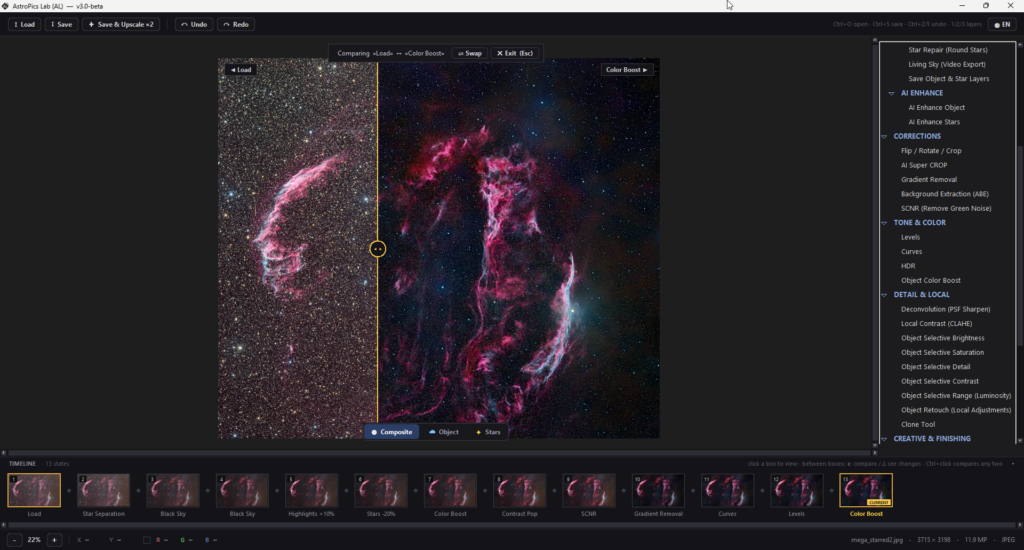
- Timeline: A visual history of your processing session: every step gets a thumbnail you can jump back to, compare states with an A/B curtain slider, or view a difference map showing exactly what changed between two steps.
- Object Selective Range (Luminosity): A new selective adjustment tool. Pick any luminance range on an interactive histogram (draggable markers, live overlay of the selection on your image) and apply brightness, contrast, saturation and detail only to that range — perfect for lifting faint nebulosity without touching the core or the background.
- Living Sky – 3 new reveal modes: Living Sky grows to 12 animation modes with three new cinematic one-shot reveals: Encounter, Approach and Fly around. Each one ends exactly on your finished image, ready for social media.
- You can see a quick overview of this version here
Installation notes:
- Download the zip file
- Unzip the file on your PC
- A folder AstroPicsLab will be created
- Enter folder and execute AstroPicsLab.exe (maybe a message from Windows defender or your antivirus will appear. Sorry about that, we are working to certificate the software). If a windows message appears, you should click on «Run Anyway». This happens because the software is still not certified, and you only need to do it the first time.
If you found an error or something is not working fine for you, please report it here:
OLD VERSION
13-07-2026 V2.2-beta
Release notes:
- New star separation AI model (v2.2): fine-tuned to catch small and faint stars that the previous model left behind. Star separation is now also exact: object + stars reconstruct the original image perfectly, with no brightness shift.
- Living Sky: bring your images to life: turn any photo into a video.
- Improved linear workflow: a complete pre-stretch pipeline for FITS/XISF. Redesigned Color Calibration, a new interactive stretch panel with draggable histogram markers and MTF | GHS algorithms, and a floating quick bar (Pre-stretch / Auto Color / Stretch) right on the canvas.
- NEW – Deconvolution (PSF Sharpen).
- NEW – Clone Tool: classic aligned clone stamp with feathered edges, working directly on the object or star layer.
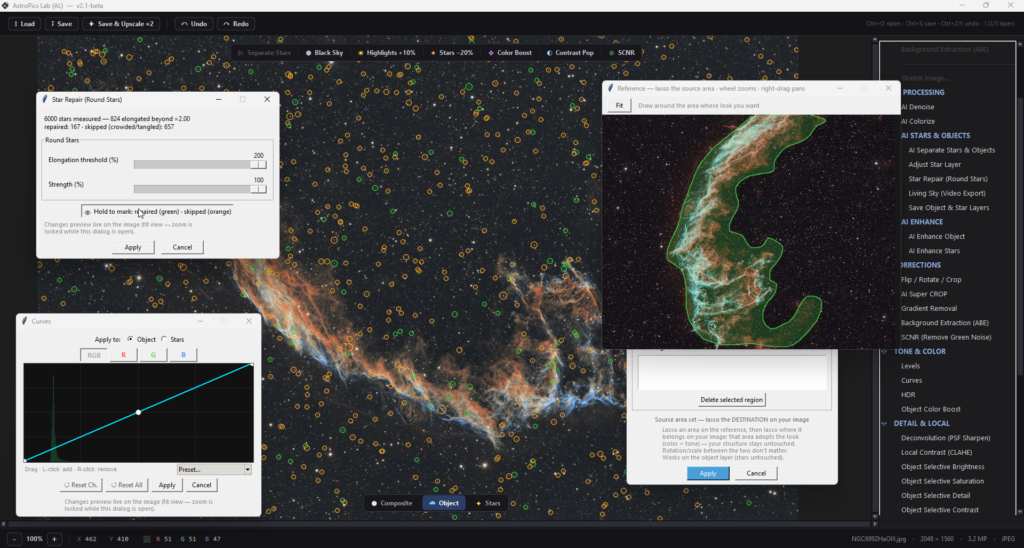
- NEW – Star Repair: repairs elongated stars without ever deforming close pairs or clusters.
- Improved AI Enhance Stars: unified, one dialog for star saturation, faint-star boost, modern glow and diffraction spikes with adjustable thickness.
- Improved Reduce Stars.
- NEW – Color Correction tools.
- NEW – Match This Look : pick a reference image and one click transfers its tone, color and detail character to your photo.
- NEW – Copy Look from Region: lasso a region in the reference, lasso a region in your image, and the target adopts that look. Supports multiple region pairs.
- Redesign Interface.
- You can see a tutorial of this version here
OLD VERSION
05-04-2026 V2.1-beta
Release notes:
- Fix crash when removing background on FITs
- Fix bug on rotate/flip FITs image
- You can see a tutorial of this version here
OLD VERSION
21-03-2026 V2.0-beta
Release notes:
- Linear Tools processing
- Curves & Levels
- Background Extraction & Gradient Removal
- AI Super Crop
- New Adjust Star Layer
- HDR & Local Contrast
- Object Retouch
- Selective & Palette Color tools
- Nebula Bloom & Star Depth of Field
- New UI with menu at right
- And more and more new functionalities…
- You can see a tutorial of this version here
OLD VERSION
01-11-2025 V1.0-beta
Release notes:
- Includes new AI Colorize functionality, to automatically paint your image (color or B/N images)
- Includes AI upscale 2x Image. A new functionality to save the image at 2x resolution without loosing quality
- New Color Palette functionality
- General improvements and bug fixing
- You can see a tutorial (in spanish) of this version here
OLD VERSION
08-10-2025 V0.2-alpha
Release notes:
- Includes new button to process automatically the image with just one click. See tutorial here
- Updated the Denoise model with 1k images from Seestar telescopes
- New Enhance model, more focused in generating detail on images.
OLD VERSION
01-10-2025 V0.1-alpha
Release notes:
- Basic AstroPics Lab application
Subscribe to receive notification when a new version is released